From Slide Projector to Shared Digital Display
See how the move from slide projectors to shared digital displays changed control of image order and pace, and choose a format that fits your group.
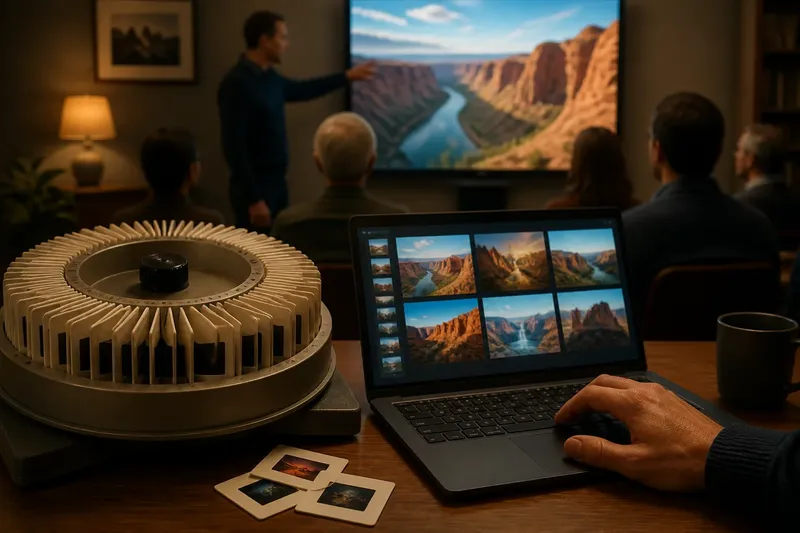
A slide projector made the presenter’s sequence visible in the carousel: once a slide was loaded, the next image followed its physical position. A shared digital display puts that sequence under the presenter’s hand, which is useful when a group needs pauses, detours or discussion, but can make the order less settled. The history of the shared digital display is therefore also a history of changing control over pace.
Order in the carousel
With photographic slides, the presentation’s order was prepared before the audience arrived. The presenter mounted each image in a frame, arranged the frames in a carousel or tray, and advanced them with a remote control. The image appeared on a screen or wall, while the physical slide remained out of reach until the session ended or someone stopped to replace it.
This arrangement made sequence tangible. If a slide was missing, upside down or placed in the wrong slot, the mistake could interrupt the showing. Rearranging the story meant handling the slides and checking their new order. That effort encouraged a settled run of images, though a presenter could still pause, repeat a frame or move ahead manually.
The projector’s pace was not entirely automatic. A speaker could linger on a picture, explain it, then press the advance button. But a carousel supplied a strong cue: the next image was already waiting, and the tool was designed around moving forward through it. The room’s attention often followed that rhythm.
Images without a tray
Digital files changed the material basis of a presentation. Instead of a sequence of mounted transparencies, a presenter could use image files in a slide deck, open pictures individually, or display content from a computer. A digital display might be a television, monitor or large-format screen, while a projector could still show digital images on a wall or screen.
That distinction matters: digital presentation did not simply replace projection with a flat panel. The image source became digital before every room had a shared digital display. A projector could still serve a large audience, while a television or monitor could suit a smaller group that needed a bright, clear image without darkening the room.
Digital files made it easier to revise the order shortly before or during a session. A presenter could select a different image, return to an earlier one, or open a detail for closer inspection. The sequence became less like a track of physical frames and more like a set of choices available through software.
Control over the pace
The central change was not simply that images became easier to store. It was that the presenter gained more ways to control what appeared next and how long it stayed visible. A slide carousel offered a dependable forward rhythm; digital software offered a broader set of possible moves, including jumping, looping, switching windows and pausing on an image without committing to a fixed order.
That flexibility can serve a group well when discussion shapes the viewing. If someone asks to compare two images, the presenter can return to the earlier one rather than asking the audience to remember it. If a detail prompts a question, the presenter can enlarge or open another view. The group’s conversation can influence the sequence instead of merely fitting into it.
More control also creates more decisions. A presenter may need to choose between a prepared deck and a folder of loose images, decide whether to reveal the next image immediately, and avoid letting menus or file windows distract the room. The best format is the one that supports the session’s intended rhythm, not the one with the most possible actions.
Choose by situation
For a talk with a clear beginning, middle and end, a prepared digital deck is usually a natural fit. It preserves a planned sequence while allowing the presenter to pause, revisit a slide or adjust the order before the audience arrives. Use concise captions and a visible progression so people can follow the argument even if the speaker slows down.
For a group comparing images, a digital display with files arranged for quick access can fit better than a tightly linear deck. Keep the images in a clearly named folder or prepare a small set of comparison slides, so the presenter can move between them without searching in front of the audience. A monitor or television may suit a close group; a projector may suit a room where people sit farther away.
For a brief, uninterrupted sequence—such as showing a series of pictures in a planned order—a traditional slide arrangement can still make sense where the equipment and slides are already available. Its physical order offers a straightforward cue for what comes next. It is less convenient when the presenter expects frequent requests to revisit or rearrange images.
For an informal meeting where the image order is uncertain, a digital display is usually more adaptable. The presenter can start with a small selection, listen to the group and choose what to show next. That approach works best when the files are easy to identify and the presenter knows how to return to the display after opening another item.
Questions about sequence?
Did digital displays end slide projection?
No. Digital content can be sent to a projector, and many rooms still use projection when an image needs to reach a broad viewing area. What changed was the source and handling of the images, not the disappearance of projected pictures.
Can a digital presentation follow a fixed order?
Yes. A slide deck can preserve a carefully planned sequence while making it easier to edit or revisit images. The presenter still decides whether to follow the deck closely or depart from it during discussion.
When does a loose image folder work better?
It can suit a session where the audience’s questions will determine which image comes next. The presenter needs clear file names and a deliberate way to move between images, otherwise searching can consume attention.
Does a larger shared display improve pacing?
Not by itself. A large image may be easier for a distant group to see, but pacing depends on the presenter’s choices and the session format. Pick a display that makes the content legible from the seats, then plan how the group will move through it.
Prepare for interruptions
A useful digital presentation has a planned route and a safe way off it. Before the session, put files in the order you expect to use them, give them names that make sense at a glance, and keep unrelated windows out of view. If you expect discussion, decide which images are worth revisiting and how you will find them without turning the session into a search exercise.
Imagine a community group reviewing pictures of a local garden. The presenter starts with a short deck showing the entrance, planting beds and seating, then keeps a labelled folder of close-up images available. When a question arises about a particular bed, the presenter opens its image, discusses it, and returns to the deck at the relevant point; the group sees both a coherent route and room for a useful detour.
For a digital display, check the connection, input source and visibility from the places where people will sit. If the screen is shared through a computer, close notifications and unrelated files before presenting. These small preparations protect the group’s attention, which is easily lost when the presenter must troubleshoot in full view.
What is not worth doing
It is rarely worth building a complicated interactive presentation just because the software allows it. Extra transitions, nested menus and multiple versions can make a simple viewing session harder to follow. If the group needs to discuss images, a short deck plus a clearly organised set of files may be enough.
Nor is there much value in reproducing the carousel’s constraints for their own sake. A fixed order helps when the narrative depends on it, but unnecessary rigidity can prevent a relevant comparison or question. Decide which parts of the sequence must remain stable and where the group can choose the next image.
Match format to control
The shift from slide projector to shared digital display gave presenters greater control over sequence and pacing, but control is useful only when it serves the audience. A planned talk benefits from a prepared deck; an exploratory discussion benefits from images that are easy to revisit; a simple, linear showing can still suit a physical slide sequence.
When choosing a shared digital display, consider not only who can see the image, but also how the presenter will move through it. The right format makes the next image predictable when structure matters and easy to change when the group’s attention takes a worthwhile turn.