E-Reader or Tablet for a Shelf of Illustrated Books?
Compare an e-reader or tablet for illustrated books by colour, page layout, portability and the titles you open most, then choose a better-fitting screen.
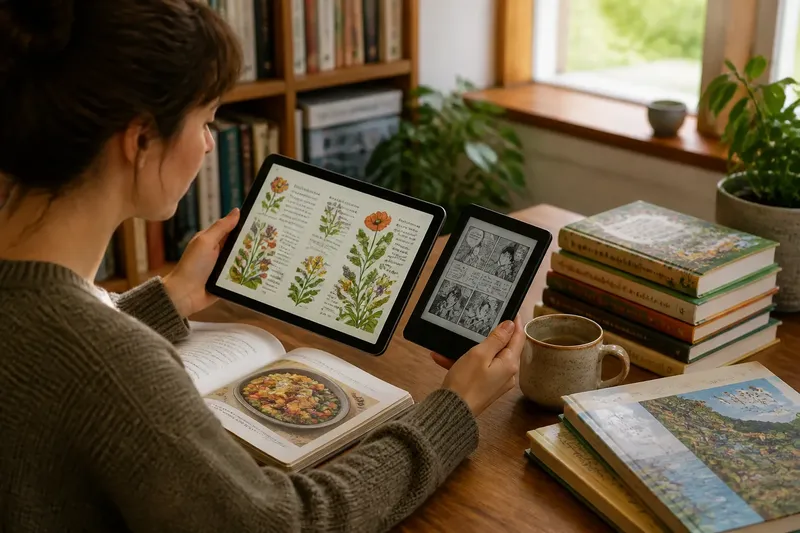
An e-reader or tablet for illustrated books is best chosen by looking at the pages you actually open, not by assuming every title needs the same screen. A map-heavy travel guide, a picture book and a graphic novel can place very different demands on colour, layout and handling.
Which screen suits your books?
A tablet is usually the more flexible choice for books that rely on colour, layered artwork, small labels or varied page designs. Its backlit colour display can make illustrations vivid and keep diagrams, captions and text together when a page is designed as a whole.
A dedicated e-reader can suit illustrated books with large, clear images and straightforward layouts, especially if you also read many text-led books. Many e-readers use reflective displays that are comfortable to view in bright surroundings, but colour capability and image handling vary by model.
Start by sorting your shelf into the types of titles you reach for: picture books, art books, comics, cookbooks, maps, illustrated reference and novels with occasional images. Then judge the device against the pages in those books, rather than the label “illustrated”.
Does colour change the choice?
Colour matters when it carries information or is part of the artwork’s meaning. A botanical guide may use colour to distinguish plants, while a graphic novel may depend on subtle shading or a particular palette; a black-and-white display can flatten those distinctions.
Colour e-readers are an option, but their appearance differs from tablet screens. Colours may look more muted, and the way a device refreshes or renders images can affect how a page feels. If you are considering one, inspect a sample of your own kind of material on the exact model when possible.
For line drawings, monochrome illustrations and books with generous text, colour may add little. In that case, page contrast, readable type and the ability to move through the book comfortably may matter more than a full-colour display.
Will the page layout fit?
Fixed-layout books preserve a designed page: artwork, captions and text stay in their intended positions. They can look excellent on a tablet when the page is large enough to read without constant zooming, but the same page may feel cramped on a compact reader.
Reflowable books let text adapt to the screen and font settings. That can help with illustrated titles whose images sit between passages, although changing the text size may alter where pictures and captions appear. Check whether the book format and reading app support the layout you need.
Look for a sample page with the smallest labels or densest panel arrangement in the book. If you have to pinch and drag across every spread, the device is making the page a chore. If the text remains legible at a comfortable viewing distance, the layout is a better match.
How portable does it need to be?
A small e-reader is easy to slip into a bag and often makes sense for reading on a commute or carrying several books without much bulk. Tablets tend to be heavier, but their larger displays can reduce the need to zoom into illustrated pages.
Think about how you hold the device, not only how it fits in a bag. A wide tablet can be awkward to use one-handed, while a reader may be easier to hold for a long session. A stand or cover can help at a table, but it will not make a device lighter when carried.
Battery expectations also depend on how you use the screen. Frequent colour viewing, wireless connections and bright settings can change how often a device needs charging; compare the maker’s guidance with your likely routine rather than relying on a single headline claim.
What should you check before buying?
- Colour: Do the books use colour to explain, distinguish or express something? If yes, inspect colour rendering on the device.
- Page format: Are the titles fixed-layout, reflowable, or a mixture? Confirm that your preferred books and apps support their format.
- Small details: Can you read captions, map keys and speech bubbles without repeated zooming?
- Page shape: Does a spread fit in portrait or landscape orientation, and can the device rotate as needed?
- Handling: Can you hold it comfortably, turn pages and reach controls in your usual reading place?
- Library access: Can you get the titles you want through the shop, library service or file format you already use?
- Other uses: Would you use a tablet for browsing, drawing or video, or do you want a device devoted to reading?
Say you mostly open children’s picture books and illustrated recipes at the kitchen table, but carry a novel on the train. A tablet may make the colour pages easier to inspect at home, while a compact e-reader may be more pleasant for the daily novel; the decision turns on which use matters more often, not on owning the broadest feature set.
Which questions settle it?
Can an e-reader display illustrated books?
Yes, if the device and book format support the title, though image quality and colour support differ. It is a stronger fit for simple illustrations and text-led books than for pages packed with fine, colour-coded detail.
Are tablets better for comics and graphic novels?
Often, because colour, page rotation and a larger display can help preserve the intended artwork and panel layout. Check whether the tablet can show a full page clearly, since a large screen alone does not make small lettering readable.
Can I read a fixed-layout book on any device?
No: the file, app and device must work together. Before choosing hardware, check the book’s listed format and whether the reading app handles its page design as intended.
Is a colour e-reader a good compromise?
It may suit readers who want a dedicated reading device but also open colour illustrations. Compare its rendering and page size with the particular books on your shelf; the compromise is not automatically right for detailed artwork.
What is not worth chasing?
Do not pay for a feature simply because it sounds useful in a product description if your books will not use it. For example, a high-colour display offers little benefit for mostly monochrome line drawings, while a slim body is no help if dense pages remain difficult to read.
Device instructions and book-format support vary by model and provider, so check those details before buying. For an e-reader or tablet for illustrated books, the sound choice is the screen that presents your most-used titles clearly and fits the place you read them; a short visit to a shop with sample pages on your phone can reveal whether the layout feels natural.